Device Photos
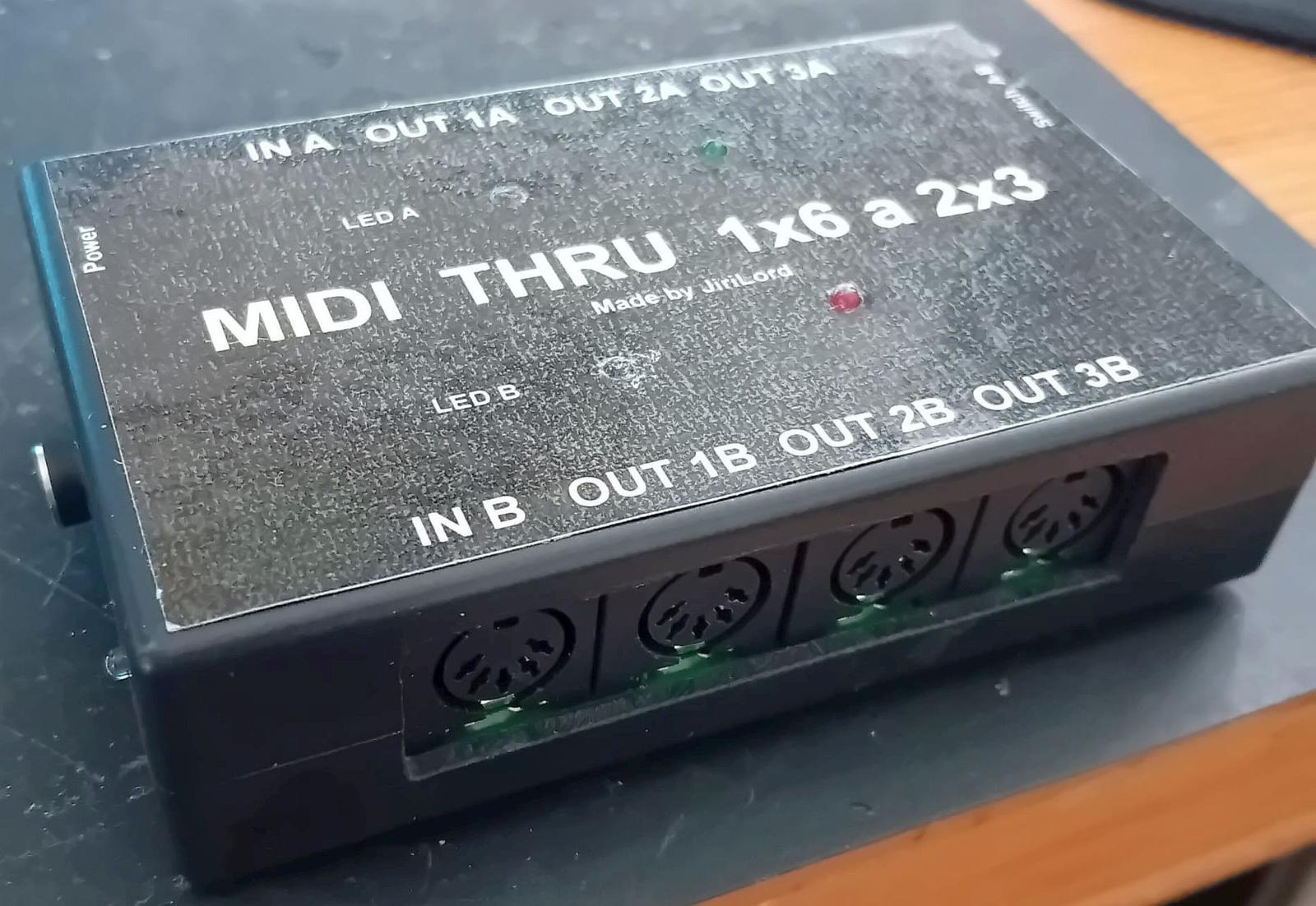
Front
Basic data
Name
JiriLord MIDI Hub 1x6 / 2x3 (Unit B)
Category
4) MIDI interfaces / MIDI routing
Type
CUSOM _ MIDI _ THRU _ DISTRIBUTOR _ (1X6 _ / _ 2X3 _ SWITCHABLE)
Specimen
B
Inventory tag
STUDIO: JIRILORD-MIDI-DIODIO-DIODIOCOVAC-B
Condition
OK
Physical parameters
Dimensions (mm)
Not specified x Not specified x Not specified mm
Dimensions (inch)
—
Weight
Not stated
Format
custom desktop MIDI utility box
Material
Not stated
Manufacturing (Period)
—
Manufacturer
—
Power
Voltage
Not stated
Current (typical)
Not stated
Current (max)
Not stated
Polarity
Not stated
Connector
Not stated
AC/DC
Not stated
Internal/External
External
Note
Check whether the unit is active or passive and supplement the exact power data according to the specific item.
Warning: Check the polarity of the source before connecting! Improper power supply will damage the device.
Firmware and serial number
Serial number
Not stated
FW version (current)
N / A / Not stated
Check date
2026-04-30
Previous version
N/A
Bootloader
N/A
Update Link
Backup File
N/A
Quick Summary
The second instance of JiriLord's custom MIDI hub, switchable between 1x6 mode and two independent 1x3 branches.
Product Description
This studio utility box serves to distribute the MIDI signal from one source to six target devices, or after switching to two separate MIDI splitters 1x3. It is a second registered piece of the same custom design designed for practical routing of multiple MIDI devices without the need to chain THRU ports through additional hardware.
Features and functions
- Custom built made by JiriLord
- Switching between 1x6 and 2x3
- Designed for operating up to six MIDI devices
- Suitable for master clock or not / CC data distribution
- Standalone MIDI routing utility without computer needs
Primary I/O (quick orientation)
| Domain | Inputs | Outputs | Note |
|---|---|---|---|
| MIDI | 1x DIN MIDI In 1x6; probably 2x DIN MIDI In 2x3 (check by panel) | 6x DIN MIDI Out / Thru; or 2x 3 outputs in separate mode | Practical purpose: from one MIDI signal to control six devices, or create two independent manifolds after three outputs. |
Controls
FRONT / TOP (user control)
- Mode switch 1x6 / 2x3
- DIN MIDI connectors for inputs and outputs
Service / hidden elements
- Verify the exact topology of ports and their description on the panel.
- To be completed if box is actively buffered or passive.
- Local HW _ PIC are partially connected (front); when the next revision add top / read / I / O detail.
Connectors and connections
Connector matrix
| Interfaces | IN | OUT | Spec / note |
|---|---|---|---|
| MIDI | 1x DIN MIDI In 1x6; probably 2x DIN MIDI In 2x3 (check by panel) | 6x DIN MIDI Out / Thru; or 2x 3 outputs in separate mode | Practical purpose: from one MIDI signal to control six devices, or create two independent manifolds after three outputs. |
Latency and jitter
Clock sources
Incoming MIDI stream
Clock IN/OUT format
MIDI note / CC / clock / change / SysEx program (check according to design)
Typical latency
Not stated
Jitter spec
Not stated
Buffer support
N/A
Impedance and signal levels
Line Level (dBu)
N/A
Mic In level
N/A
Output Impedance
N/A
Input Impedance
N/A
THD
N/A
Frequency Range
N/A
Other Specifications (from metadata.specifications)
| Key | Value |
|---|---|
| No other specifications | |
Additional technical details
| Key | Value |
|---|---|
| compatibility | N / A (standalone hardware) |
| compatibility | Any hardware or software with DIN MIDI output, Sequencers, Keyboards, Groveboxes, DAW MIDI out |
Typical routing
- One master sequencer to six devices: 1x6 mode for distribution of one MIDI source to the whole group of synths or effects.
• Connect master MIDI source to main port of the box
• Switch device to 1x6 mode
• Divert six outputs to the target MIDI device - Two independent MIDI clusters: 2x3 mode for separate control of two separate MIDI devices.
• Switch device to 2x3 mode
• Bring two separate MIDI resources to the corresponding branches
• Connect each three outputs to your own tool group
Connection instructions: The examples below show typical signal flows in practice. For specific details (jitter, buffering), see section above.
SW / drivers
| Component | Windows | macOS | Linux | Note |
|---|---|---|---|---|
| OS compatibility | — | — | — | — |
Custom firmware details
Author
—
FW family
—
Custom FW targets
- No explicit custom FW targets in metadata.
Custom CC mapping
| CC | Meaning |
|---|---|
| No custom CC mapping. | |
Custom FW global settings
| Settings | Meaning |
|---|---|
| No custom global settings. | |
Custom FW extended menu
| Item | Detail |
|---|---|
| No extended menu details. | |
Documentation and manuals
Manufacturer / Links
- eBay - search JiriLord MIDI Hoverbox 1x6 / 2x3 (Unit B)
- Aukro.cz - search JiriLord MIDI Hoverbox 1x6 / 2x3 (Unit B)
- Music Bazar.cz - Search JiriLord MIDI Dipper 1x6 / 2x3 (Unit B)
- MIDI.cz - search JiriLord MIDI Hedge 1x6 / 2x3 (Unit B)
- Kytary.cz - search for JiriLord MIDI
- Heureka.cz - search for JiriLord MIDI
- Gear4music.cz - Search JiriLord MIDI Hedge 1x6 / 2x3 (Unit B)
- Muziker.cz - search JiriLord MIDI Hole 1x6 / 2x3 (Unit B)
Service log
| Date | Event | Who | Note |
|---|---|---|---|
| 2026-04-30 | Initial inventory insert | Copilot | Established record for custom MIDI hub made by JiriLord, unit B. |
Presets / User banks
Storage type
N/A
Number of banks
N/A
Current bank
N/A
Backup File
N/A
Export format
N/A
Note
Custom routing utilities without preset memory.
Notes / service / modifications
- Custom utility box designed for practical MIDI divorce in hardware studio.
- The exact electrical and mechanical parameters need to be completed after physical revision of the unit.
- This entry represents specimen B; the first piece is kept separately as A.
- Local HW _ PIC documents the front view of specimen B.