Device Photos
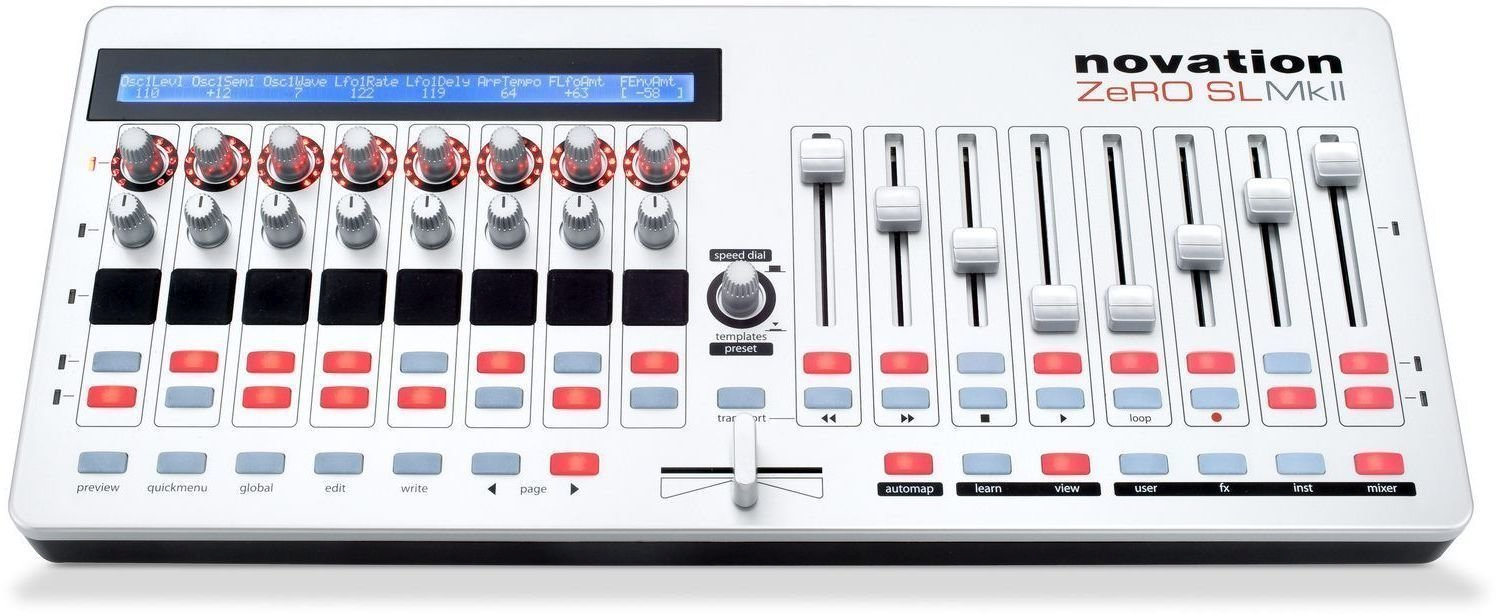
Top
Basic data
Name
Novation Zero SL MK2
Category
3) MIDI / control surfaces / utility controllers
Type
MIDI_CONTROL_SURFACE
Specimen
A
Inventory tag
HW-2024-KO-ZERO-SL-001
Condition
OK
Physical parameters
Dimensions (mm)
—
Dimensions (inch)
—
Weight
—
Format
—
Material
—
Manufacturing (Period)
—
Manufacturer
—
Power
Voltage
USB bus power or 9V DC
Current (typical)
~ 600 mA
Current (max)
1000 mA
Polarity
Centre pin positive
Connector
DC Barrel + USB Type-B
AC/DC
DC
Internal/External
External
Note
For standalone HW control use external 9V DC PSU (manual states 600- 1000 mA).
Warning: Check the polarity of the source before connecting! Improper power supply will damage the device.
Firmware and serial number
Serial number
Not stated
FW version (current)
2.x (latest available for MK2)
Check date
2026-03-06
Previous version
1.x
Bootloader
Yes (firmware update via USB)
Update Link
Backup File
User MIDI SysEx dump recommended
Quick Summary
USB/MIDI control surface for DAW and external hardware (no keyboard, no audio interface).
Product Description
—
Features and functions
- 8 touch sensitive endless encoders with LED rings
- 8 touch sensitive potentiometers
- 8 touch sensitive 60mm fader + 1 horizontal crosspader
- 8 velocity- sensory paddles
- 32 backlit buttons (including transport functions)
- LCD display for parameters names / values
- Automap and Advanced Mode
- USB connection to computer (MIDI + power supply)
- DIN MIDI In / Out / Thru connectivity for hardware setup
- Inputs for control and expression pedal
- Internal templates / present for mapping
Primary I/O (quick orientation)
| Domain | Inputs | Outputs | Note |
|---|---|---|---|
| MIDI | USB MIDI, DIN MIDI In (port 1) | USB MIDI, DIN MIDI Out 1, DIN MIDI Out 2 | |
| Pedals | Control pedal in, Expression pedal in | N/A | Expression requires 3-pin jack according to manual. |
Controls
FRONT / TOP (user control)
- 8 × touch- sensitive endless encoders with LED rings
- 8 × touch- sensory potentiometers
- 8 × touch- sensitive 60mm fader
- 1 × touch- sensitive horizontal / cross fader
- 8 × velocity-sensory drum of falls
- 32 × backlit buttons
- Transport of buttons (switch function)
- Automap buttons + Preview + Page Up / Down
- Speed Dial / Template- Preset Knob
- LCD display for names and parameters
Service / hidden elements
- (None)
Connectors and connections
Connector matrix
| Interfaces | IN | OUT | Spec / note |
|---|---|---|---|
| MIDI | USB MIDI, DIN MIDI In (port 1) | USB MIDI, DIN MIDI Out 1, DIN MIDI Out 2 | |
| Pedals | Control pedal in, Expression pedal in | N/A | Expression requires 3-pin jack according to manual. |
Latency and jitter
Clock sources
Internal, USB MIDI, External MIDI
Clock IN/OUT format
MIDI clock
Typical latency
N / A (MIDI controller)
Jitter spec
N/A
Buffer support
N/A
Impedance and signal levels
Line Level (dBu)
N/A
Mic In level
N/A
Output Impedance
N/A
Input Impedance
N/A
THD
N/A
Frequency Range
N/A
Other Specifications (from metadata.specifications)
| Key | Value |
|---|---|
| No other specifications | |
Additional technical details
| Key | Value |
|---|---|
| compatibility | Windows XP SP3 +, Windows Vista / 7 / 8 / 10 / 11, MacOS 10.4 + |
| compatibility | Pro Tools, Ableton Live, Logic Pro, Studio One, Reaper, Generic USB MIDI DAWS |
Typical routing
- DAW + external hardware control: At the same time, ZERO SL MkII controls both software and HW MIDI devices.
• Connect USB to your computer for DAW / Automap
• Connect DIN MIDI Out 1 / 2 to external device
• Optionally connect MIDI In / Thru according to routing
• Configure Template and ports in the device
Connection instructions: The examples below show typical signal flows in practice. For specific details (jitter, buffering), see section above.
SW / drivers
| Component | Windows | macOS | Linux | Note |
|---|---|---|---|---|
| OS compatibility | — | — | — | — |
Custom firmware details
Author
—
FW family
—
Custom FW targets
- No explicit custom FW targets in metadata.
Custom CC mapping
| CC | Meaning |
|---|---|
| No custom CC mapping. | |
Custom FW global settings
| Settings | Meaning |
|---|---|
| No custom global settings. | |
Custom FW extended menu
| Item | Detail |
|---|---|
| No extended menu details. | |
Documentation and manuals
Manufacturer / Links
- Official site of manufacturer
- eBay - search for Novation Zero SL MK2
- Aukro.cz - search Novation Zero SL MK2
- MusebnBazar.cz - search Novation Zero SL MK2
- MIDI.cz - search for Novation Zero SL MK2
- Kytary.cz - search for Novation Zero SL MK2
- Heureka.cz - search for Novation Zero SL MK2
- Gear4music.cz - search Novation Zero SL MK2
- Muziker.cz - search for Novation Zero SL MK2
Service log
| Date | Event | Who | Note |
|---|---|---|---|
| 2026-03-03 | Initial inventory | Studio tech | Added to inventory |
Presets / User banks
Storage type
—
Number of banks
Integrated Settings
Current bank
1
Backup File
Not stated
Export format
MIDI SysEx dump
Note
—
Notes / service / modifications
- It's not a keyboard. It's a keyboard-free control screen and no internal audio interface.